iPhone and iPad
Split expenses on your iPhone, straight from Safari
The iOS app isn't out yet, but you don't have to wait for it. Add Split & Done to your Home Screen from Safari and it opens from its own icon, full screen, with notifications when something changes in your groups.

Free · No ads · Android & web On iPhone? Add it from Safari
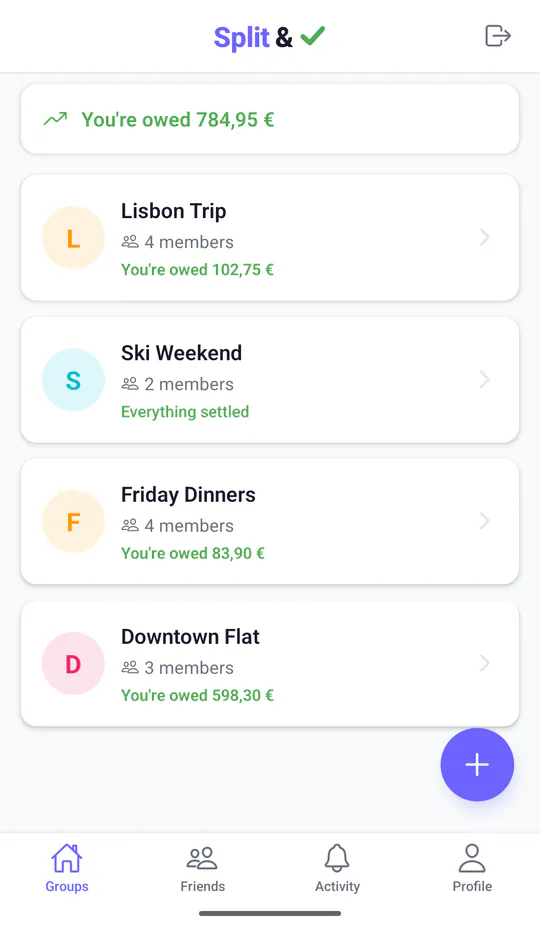
Same groups, same balances, on any phone
Groups are rarely all Android or all iPhone. Split & Done works in the browser, so the friend with an iPhone sees the same expenses and the same balances as everyone else, updated in real time.
Added to the Home Screen, it stops feeling like a website: no address bar, its own icon next to your other apps, and notifications for new expenses, payments and invitations. It needs iOS 16.4 or later for notifications, and an internet connection to save changes.
Just one bill? Split bill calculator
Add it to your iPhone in four steps
-
1. Open it in Safari
Go to app.splitndone.com in Safari and sign in, or create a free account.
-
2. Add it to your Home Screen
Tap Share, then Add to Home Screen. Split & Done appears next to your other apps with its own icon.
-
3. Open it from the icon
From now on, open Split & Done from the Home Screen. It runs full screen, without Safari's address bar.
-
4. Turn on notifications
In Profile, turn on Notifications and allow them when iPhone asks. You'll hear about new expenses, payments and invitations.
Split & Done on iPhone: common questions
Is there a Split & Done app for iPhone?
The iOS app is coming soon. Until then, add Split & Done to your Home Screen from Safari: it opens from its own icon, full screen, and can send you notifications.
Do notifications work on iPhone?
Yes, on iOS 16.4 or later, once Split & Done is on your Home Screen. Open it from the icon, go to Profile and turn on Notifications. In an ordinary Safari tab they can't be turned on.
Is it the same as the Android app?
Your groups, expenses and balances are exactly the same, and they update in real time on every device. The difference is that on iPhone it needs an internet connection to save changes.
Can I use one account on iPhone and Android?
Yes. Sign in with the same account on any phone or computer and you'll see the same groups. It's free everywhere.
More ways to use Split & Done
-
Group trips
Travel expenses like flights, rooms, dinners and taxis, each paid by someone different — in more than one currency if you cross a border. Settle up once you're home.
-
Friends
Dinners, concerts, birthday presents. Split the bill with friends and keep a running tab, instead of settling up every time.
-
Couples
Share costs 50/50 or by percentage, whatever feels fair to you both, without keeping score in your head.
-
Roommates
Split rent, bills, groceries and cleaning supplies. Everyone sees what's been paid and what's still owed, month after month.

Your iPhone is ready.
Open Split & Done in Safari and add it to your Home Screen.
Free · No ads · Android & web On iPhone? Add it from Safari